2D guides or construction lines
Construction lines and circles help you draw profiles. They appear as magenta (dark pink) lines by default. Here you can see the magenta construction lines, a white profile, and a green workplane:
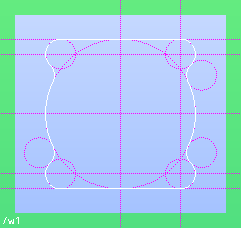
New users commonly try to apply Modeling commands (to create 3D geometry) such as Pull Linear or Pull Angular to construction lines; however, construction lines are ignored by commands that create 3D geometry.
To create construction lines, click Modeling and then, in the Draw group, use the Construction Line commands such as  2 Points or
  Parallel.
2 Points or Parallel.Help is available in the prompt line as you use each command.