Add a chamfer to a threaded part
You can easily add chamfers to the ends of threaded faces, and they will be automatically calculated so they match the threads. The inner diameter of the chamfer will be the same as the minor diameter of the thread.
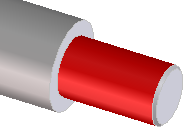
To add a chamfer to a threaded face,
1. Click Part Library and then, in the Thread group, click the arrow next to  Chamfer.
Chamfer.2. Click Create chamfer.
Create chamfer.3. Select the threaded face in the viewport.
4. Click OK  to complete the operation.
to complete the operation.