Create a 3D curve from intersecting faces
The 3D Curve By Intersection function enables you to define a 3D curve from the intersection of two faces. You simply select the two 2D faces, and Creo Elements/Direct Modeling creates 3D curves at their curves of intersection.
The figure shows two intersecting face parts and the resulting 3D curve at the curve of intersection.
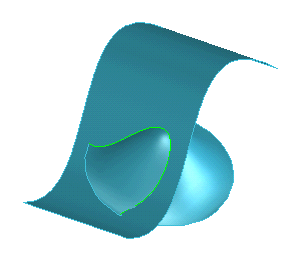
To create a 3D curve from intersecting faces,
1. Click 3D Geometry and then, in the 3D Curve group, click More next to  Spline 3D.
Spline 3D.2. Click  Curve by Intersection in the Indirect section. The By Intersectn dialog box opens.
Curve by Intersection in the Indirect section. The By Intersectn dialog box opens.3. Type a name for Part.
4. Click two or more intersecting faces in the viewport.
5. Click  to complete the operation.
to complete the operation.