Load a drawing from Creo Elements/Direct Drawing Manager
When you use drawings from the Creo Elements/Direct Drawing Manager database, you can take advantage of these powerful options:
• Use different revisions of a drawing.
• Easily identify if you or others have locked the drawing.
• Include change notes for each revision of a drawing.
• Use up-to-date title block data based on values in the database.
Load a drawing from Creo Elements/Direct Drawing Manager to Creo Elements/Direct Drafting
1. Start a new session in Creo Elements/Direct Drafting and Creo Elements/Direct Drawing Manager.
2. Click the Recent List tab in the Creo Elements/Direct Drawing Manager Workspace bar.
3. Right-click the drawing (like the one you used in Part 1) and select Load. Creo Elements/Direct Drawing Manager uses the latest revision of the drawing. The Drawing Manager Load dialog box appears.
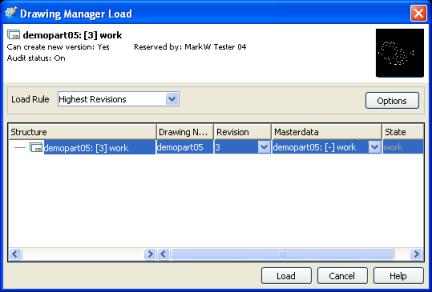
 |
If you double-click the drawing, the drawing loads directly in Creo Elements/Direct Drafting using the Load dialog defaults.
|
4. Select a Load Rule to specify the version you want to use.
|
About load rules
|
||
|---|---|---|
|
By default, Creo Elements/Direct Drawing Manager loads the highest revision of the drawing. Use As Stored to load a drawing with the revision in which it was last stored.
|

5. Click Load. Once the Load dialog closes, be sure to click Confirm in Creo Elements/Direct Drafting. The drawing is now loaded.
|
How Creo Elements/Direct Drawing Manager and Creo Elements/Direct Drafting use names.
|
|---|
|
After you load a drawing from Creo Elements/Direct Drawing Manager, Creo Elements/Direct Drafting displays two names for your drawing:
• In the top title bar of Creo Elements/Direct Drafting, you'll see drawing_manager.mi. This is a default name for any .mi file stored in Creo Elements/Direct Drawing Manager.
• In the top left corner of the Creo Elements/Direct Drafting viewport, you'll see the drawing name as you saved it in Creo Elements/Direct Drawing Manager.
Always look to the viewport for the name of the drawing, or go to the Creo Elements/Direct Drawing Manager menu and click > . The Drawing ID shows you the name of the drawing, the revision number, and its state. The Drawing ID is also helpful if you left the name of the drawing as Top.
|
Modify the drawing in Creo Elements/Direct Drafting
Use additional Creo Elements/Direct Drawing Manager features when you modify your drawing.
1. Make some changes to your drawing.
2. Save the drawing to Creo Elements/Direct Drawing Manager. From the Save dialog box, choose Major Rev as the Save Type, and add a Change Note that explains your modification.
|
About Change Notes
|
|---|
|
In the Save dialog, click the
 to open the Change Note dialog box. The number in Change Index is the revision of the drawing. to open the Change Note dialog box. The number in Change Index is the revision of the drawing.• Type a Comment that describes your changes.
• Type a Title for the change note.
To view the Change Notes later, open the DB Properties menu and select the Notes tab.
|
 |
Make sure to identify these modifications with a Change Note so other designers will know why you modified the data.
|
Will it work for you?
You've loaded and modified 2D data. Now look at the Load features and the advantages of loading your data from the database:
• Work only with the data you need.
• Look at the properties of your data.
Tour the Creo Elements/Direct Drawing Manager Load dialog
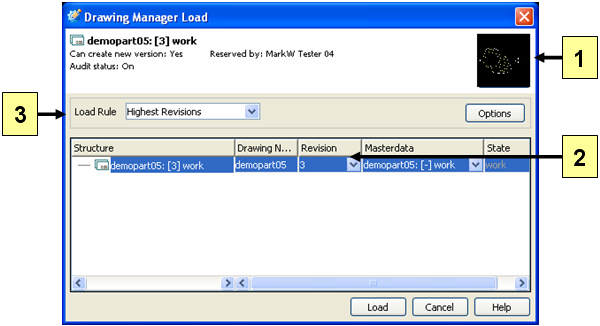
1. Preview. A thumbnail image of the drawing.
2. Revision. Choose the revision you'd like to load.
3. Load Rule. Select a Load Rule for the drawing.
Try this on your system
• View the revisions of drawings.
◦ From the workspace, right-click a drawing and select > . Click the Structure column to change the order of the revisions from ascending to descending. Open other tabs to see additional drawing information.
• Manage multiple revisions of a drawing.
◦ In DB Properties, open the Notes tab. Find all Change Notes for a drawing here. You can also add a new note: click Add and type your comment.
|
|
When Creo Elements/Direct Drawing Manager is on, you can use the set of frames stored in the database. When you modify one of these frames, the modifications will be seen in all drawings that use that frame. The title blocks of these frames contain values about the drawing from the database, Masterdata, and Change Notes.
Add text references to your title blocks: Go to the Creo Elements/Direct Drawing Manager menu in Creo Elements/Direct Drafting and select > .
|