Dimensioning a Chamfer
Chamfered surfaces can be dimensioned using the CHAMFER command in the DIMENSION 1 menu. (This feature is required in certain countries to meet recognized design standards.)
By default the chamfer dimension is preceded by the character C. Only chamfered surfaces created with the chamfer option Vertex or set at an angle of 45° can be dimensioned.
Dimensioning a Chamfer
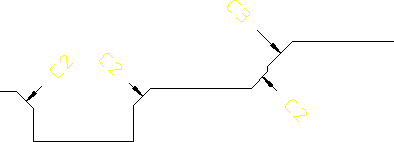
To dimension a chamfer:
1. Press DIMENSION 1.
2. Pick CHAMFER.
3. Select MANUAL or AUTO placement.
4. Identify one or more vertices.
5. If MANUAL placement was selected, indicate the desired location for the dimension text(s), using the dimension trace for guidance.
6. Press END to end this command.
 | Use DIM_CHAMFER_TEXT_CONTROL and DIM_CHAMFER_PREFIX_STRING to change the default chamfer prefix string. If you stretch a chamfer or its reference geometry, the chamfer reference geometry is updated. However, the chamfer dimensions are not updated. The chamfer dimensions may not be visible after you stretch the chamfer. |