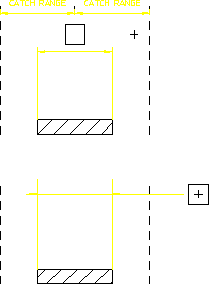
Catch Range
This section shows how to center dimension text whenever you indicate a point within the catch range. The catch range is governed by two catch lines parallel to the extension lines. The origin is the bisection of the distance between the two extension lines and the catch range is the horizontal distance from the origin to the catch lines. If you indicate any point within the catch range, Creo Elements/Direct Drafting will center the dimension text exactly between the two extension lines.
Following figure shows the catch range. Any point you indicate within the catch range results in Creo Elements/Direct Drafting centering the dimension text.
Dimension Catch Range