Revision Checking
This chapter tells you how to use the commands and options that allow you to compare similar drawings. This facility is particularly useful in design offices where successive drawings are revised and you need to identify the differences between revisions. For example, suppose you create a drawing of a plate early on in the development stage. A few weeks later you revise this drawing by stretching it, adding fillets, and adding holes. You can now compare the original drawing with the revised drawing to see where changes have been made. The differences between the original and revised drawings are shown in color.
 Revision checking is possible on drawings stored in MI-format 2.10 or higher. Incorrect results may occur if you attempt to compare drawings saved in MI-formats earlier the 2.10. Revision checking is possible on drawings stored in MI-format 2.10 or higher. Incorrect results may occur if you attempt to compare drawings saved in MI-formats earlier the 2.10. |
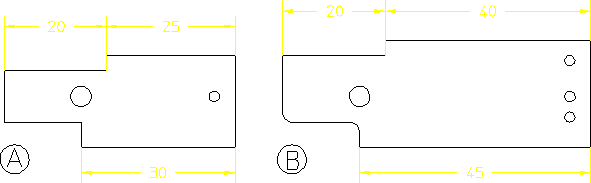
The following figure shows the original drawing (A) and the revised drawing (B).
Original Drawing and Revised Drawing
The following figure shows A and B superimposed so that you can easily identify the modified elements.
Both Files Loaded
