Writing the Arrowhead Macro
Here is the step-by-step sequence:
1. Draw the arrowhead at any angle to the axes and annotate all the points. The points to be picked from the screen are P1 and P2. Draw in any point for the origin (0,0).
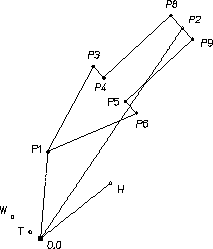
2. Work on the macro body first. For a geometry macro this is the part that does the drawing. Assume that the points P1 and P2 are defined and that they each represent the head of a vector drawn from the origin as shown in the previous figure.
3. The barbs of the arrowhead are a certain proportion (let's use 60%) of the total length along the centerline (from the arrowpoint). Define a vector with this length between P1 and P2 in the direction of P2 and call it H. Like all other vectors, H originates at 0,0.
LET H (0.6 * ( P2 - P1 ) )
4. The barbs are a certain proportion (let's use 30%) of H away from the centerline. Define a vector of this length normal to H and call it W.
LET W ( 0.3 * ( ROT H 90 ) )
5. The half-thickness of the tail is a certain proportion (let's use 40%) of W. Define a vector of this length in the direction of W and call it T.
LET T ( 0.4 * W )
6. Now the points can be defined. Add H and W to P1 to define the point P3 as in the next figure.
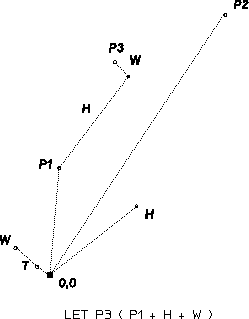
LET P3 ( P1 + H + W )
7. Define the other points in exactly the same way.
LET P6 ( P1 + H - W )
LET P4 ( P1 + H + T )
LET P5 ( P1 + H - T )
LET P8 ( P2 + T )
LET P9 ( P2 - T )
LET P4 ( P1 + H + T )
LET P5 ( P1 + H - T )
LET P8 ( P2 + T )
LET P9 ( P2 - T )
8. Join the points to create the arrowhead shape.
LINE POLYGON P1 P3 P4 P8 P9 P5 P6 P1
The macro body is finished, and now we can move on to handling the points P1 and P2, which are picked from the screen. The READ command allows the user to enter the coordinates of P1 and P2:
READ PNT 'Pick the arrow point' P1
READ PNT tells the system that a point is going to be input. The system displays the message Pick the arrow point. When the user enters a point, it is defined as P1 and the next line of the macro is executed.
READ PNT 'Pick the tail centerpoint' RUBBER_LINE P1 P2
In this line, the RUBBER_LINE command draws a line between P1 and the cursor as it is moved across the screen. This is useful for sizing the arrowhead. When the next point is entered it is defined as P2 and the next line is executed. This next line is the start of the macro body.
Now enclose the READ statements and the macro body in a loop, using LOOP and END_LOOP. This allows the user to create several arrowheads during the same operation. Specify LINETYPE and COLOR outside the loop, so that they can be altered during operation if required. Define all the macro variables as LOCAL.
Here is the completed macro:
DEFINE Arrow_head
LOCAL P1
LOCAL P2
LOCAL P3
LOCAL P4
LOCAL P5
LOCAL P6
LOCAL P8
LOCAL P9
LOCAL H
LOCAL W
LOCAL T
COLOR WHITE
LINETYPE SOLID
LOOP
READ PNT 'Pick the arrow point' P1
READ PNT 'Pick the tail centerpoint' RUBBER_LINE P1 P2
LET H (0.6 * ( P2 - P1 ) )
LET W ( 0.3 * ( ROT H 90 ) )
LET T ( 0.4 * W )
LET P3 ( P1 + H + W )
LET P6 ( P1 + H - W )
LET P4 ( P1 + H + T )
LET P5 ( P1 + H - T )
LET P8 ( P2 + T )
LET P9 ( P2 - T )
LINE POLYGON P1 P3 P4 P8 P9 P5 P6 P1
END
END_LOOP
END
END_DEFINE
LOCAL P1
LOCAL P2
LOCAL P3
LOCAL P4
LOCAL P5
LOCAL P6
LOCAL P8
LOCAL P9
LOCAL H
LOCAL W
LOCAL T
COLOR WHITE
LINETYPE SOLID
LOOP
READ PNT 'Pick the arrow point' P1
READ PNT 'Pick the tail centerpoint' RUBBER_LINE P1 P2
LET H (0.6 * ( P2 - P1 ) )
LET W ( 0.3 * ( ROT H 90 ) )
LET T ( 0.4 * W )
LET P3 ( P1 + H + W )
LET P6 ( P1 + H - W )
LET P4 ( P1 + H + T )
LET P5 ( P1 + H - T )
LET P8 ( P2 + T )
LET P9 ( P2 - T )
LINE POLYGON P1 P3 P4 P8 P9 P5 P6 P1
END
END_LOOP
END
END_DEFINE
Remember that there are many ways of writing a macro to do the job. An alternative method is to turn the axes to the required angle before establishing the points and drawing the shape. This method would use commands such as CS_SET, CS_ROTATE, CS_REF_PT, CS_AXIS.