Unique Partnames
ME10 automatically generates names for parts when you create them. These names are shown in the parts tree and are represented by numbers: ~1,~2, ...
This feature is useful when handling parts by macros. For example, a typical parts tree may look like this:
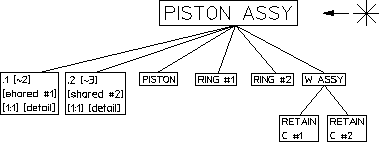
Unique parts naming has the following functionality:
• Each part is specified by a number.
• Shared parts within shared parts are identified with the same unique partname because they exist once only in the data structure.
Shared parts within shared parts are marked with [shared in shared #n]
• Parts can be made active by entering EDIT-PART followed by the name of the part. Two examples are provided below.
EDIT_PART 'bracket'
EDIT_PART '~2'
If you enter EDIT_PART and the parts structure has more than one part with the same partname, ME10 prompts you to specify the part number.
With INQ 900 and INQ 901, you get a string list of unique partnames (~2, ~3).
• INQ_ENV 8 INQ 5 for inquiry of the offset. For loading several drawings, the maximum used unique partname can be inquired (useful when running macros).
• You can click Delete, All and Confirm to reset the parts numbering.
• Refreshing partnames can be done by entering the command:
RESET_PART_NUMBER