Dimension Text Offset
 |
This function only works if you have previously selected either Above or Below from the Location list.
|
Following figure shows the distance (or offset) between the dimension line and dimension text. The Creo Elements/Direct Drafting default for this distance is 2 mm.
Dimension Text Offset
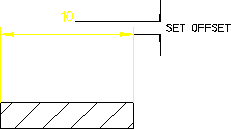
To set the dimension text offset:
1. Click the Text tab in Dimension Settings.
2. Enter a positive offset into the Offset Line field.