Modifying Splines
You can modify the shape of a spline using the following commands:
|
CHG I PNT
|
Lets you change the position or tangent of an interpolation point. With this command, the basic shape of the spline changes--see the following figure.
|
|
CHG C PNT
|
Lets you change the position of a control point. In this case, the control polygon must be visible.
|
|
CHG PNT
|
Lets you change the position of a spline. With this command, the basic shape remains the same--see the following figure.
|
The following figure shows the effects of the commands CHG I PNT and CHG PNT.
Effects of CHG I PNTand CHG PNT
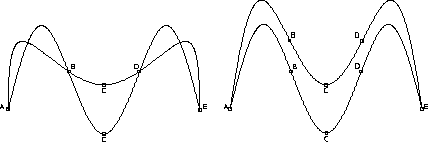
The splines on the left were created as follows:
1. Pick CHG I PNT.
2. Identify the spline.
3. Pick point C.
4. Move point C up the screen.
The spline curve continues to pass through the interpolation points at B and D.
To create the splines on the right, follow the previous procedure but use the command CHG PNT. In this case, the general shape of the spline is retained because the interpolation points B and D also move.
The following table lists some advantages and disadvantages of using the commands CHG I PNT, CHG PNT, and CHG C PNT.
Advantages | Disadvantages | |
|---|---|---|
CHG I PNT | The whole spline shape is recomputed. When you move the position of an interpolation point, the position of the other interpolation points remains. | You can pick interpolation points only. You cannot pick arbitrary points. This command works for splines created by specifying interpolation points only. The spline curve gets a rippling effect. |
CHG PNT | The shape of the spline curve is retained and you do not get a rippling of the curve. You can pick an arbitrary position, for example, between two interpolation points. This command works for splines created by specifying control points and for splines created by specifying interpolation points. | The positions of all interpolation points change. |
CHG C PNT | The whole spline shape is recomputed without the rippling effect produced when using CHG I PNT. This command works for splines created by specifying control points and for splines created by specifying interpolation points. | The positions of all interpolation points change. |