Hatch Angle
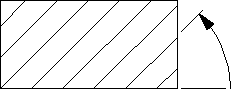
This is the default option. The angular units will be those you selected in the SETUP module. A zero value is horizontal and a positive angle results in counterclockwise rotation.
Positive Hatch Angle
To set the hatch angle:
1. Press HATCH.
2. Pick Angle in SET.
The current hatch angle will be displayed in the System Prompt Line.
3. Enter the new value and all subsequent hatch lines will be drawn at the new hatch angle.