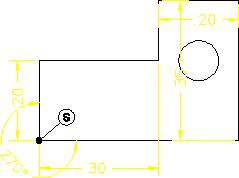
Swap the dimensions
1. Click > > > .
2. Click the dimension 20 on the left of the drawing.
3. Enter 25 on the command line.
The shape changes. But because this is not the design you want, you need to redimension it.
4. Click Undo.
5. Click Redraw in View.
6. Click Dimension, Angular, Direct.
7. Click the intersecting lines at S.
8. Click Redraw in View.
9. Click Parametric, Modify, Dimension, Show, and enclose the entire design in a box.
10. Click Parametric, Modify, Dimension, Swap, and click the yellow angle.
11. Click the dimension 15 (this dimension disappears because the angle becomes the driving dimension).
12. Click Redraw in View.