Modify the design
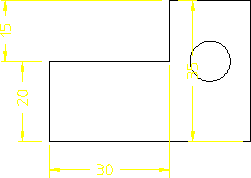
To modify the design, click > > > and enclose the design in a box. Creo Elements/Direct Drafting displays the design's dimension in green to indicate that these are the driving dimensions. It is the driving dimensions that are used to modify the design according to the design-capture rules. These dimensions reflect the way in which you created the design.
 |
Remember to use the windowing functions for fitting, panning, and zooming!
|
To modify the design:
1. Click > > > .
2. Click the dimension 40 (it changes to yellow).
3. Enter 30 on the command line.
4. Click End.
The design changes according to the modified dimension.