Load the Part
The part for this example is normally stored on your system in the file \me10\pd_demos\demo01.mi. To load this part into Creo Elements/Direct Drafting, Type in:
load '\me10\pd_demos\demo01.mi' [Enter]
If you can't find this file on your system, use Creo Elements/Direct Drafting to generate it. Be sure to include all the dimensions and construction lines if you draw the part yourself.
Demopart01
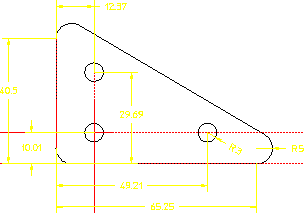
The important features of this part for parametric design are as follows:
• It is an ordinary Creo Elements/Direct Drafting part.
• It is fully dimensioned. The length and height are specified, as is the radius of one corner. The location and radius of the holes is also given. Generally, a part with full dimensioning works best for Parametric Design.
• It is "clean." There are no duplicate or stacked elements. Such inconsistencies can lead to unexpected results. Parametric Design has several commands that find and fix inconsistencies in a part, but you won't have to use them right away!
• Construction lines have been used to mark the "origin" of the part as well as the centerlines of the holes. Construction geometry, if available, is often very useful to the Parametric Design solver. When possible, you should include construction geometry to mark important features of a part: major axes, lines of symmetry, centerlines of circles, etc.