Using Overdraw
Use Overdraw to draw a contour between intersection points in the construction geometry. The lines will be drawn over the existing construction lines and circles just as you would line in a contour by hand.
Additionally, it is not necessary to click each construction geometry intersection point before clicking the line or arc you want to draw over. You simply click the next construction geometry element and Creo Elements/Direct Drafting calculates the intersection point. This saves one click for every overdraw action.
To use the Overdraw command:
1. Draw the construction geometry as shown in following figure. Using the Overdraw Command.
2. Click Overdraw.
3. Specify the start point (1).
4. Specify points 2 to 14 (end point).
Using the Overdraw Command
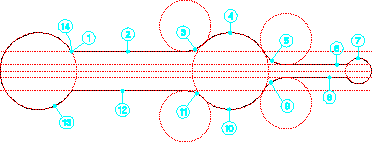
The Overdraw command also supports multiple Undo operations.