Specifying the Contour Level
To facilitate the selection of nested contours, Creo Elements/Direct Drafting enables you to specify a selection level by typing contour_level followed by an integer.
|
contour_level 0
|
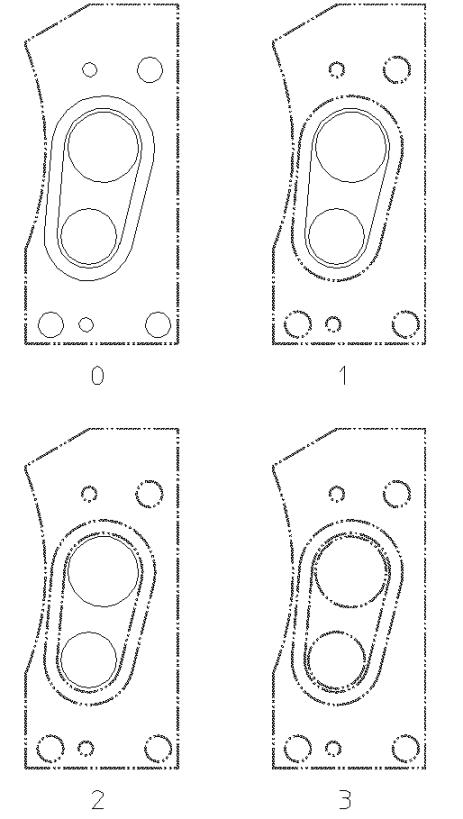
This is the default. Only the "outer" contours in the selection polygon are selected. See the part labeled 0 as shown in the following figure: Contour Levels.
|
|
contour_level 1
|
In addition to the outer contours, the first contours encountered within the outer contours are selected. See the part labeled 1 as shown in following figure: Contour Levels.
|
|
contour_level 2
|
In addition to the contours in contour level 1 (including all level 0 contours), the first contours encountered within level 1 contours are selected. See the part labeled 2 as shown in the following figure: Contour Levels.
|
|
contour_level 3
|
In addition to the contours in contour level 2 (including all level 1 and level 0 contours), the first contours encountered within level 2 contours are selected. See the part labeled 3 as shown in the following figure: Contour Levels.
|
Contour Levels