Setting the Load Value
This section shows how to define a loading offset in the z-direction for elements that are loaded in the future.
The default load z-value is None. If you load elements with the load z-value set to None, their z-value (if any) remains unchanged.
To set a load offset z-value:
1. Click Generate Element in Hidden.
2. Click Load Z Value in Generate Element.
3. Enter the required load offset z-value into the User Input Line. Alternatively, click a reference element set to a given z-value and then click Above, Same, or Below in Options.
Creo Elements/Direct Drafting assigns the required load z-value to any elements loaded in the future.
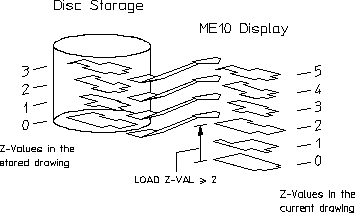
To load drawing elements with a load z-value of 2:
1. Click Generate Element in Hidden.
2. Click Load Z Value in Generate Element.
3. Enter 2.
4. Load an existing drawing file.
Creo Elements/Direct Drafting loads the drawing elements as shown in following figure.
Loading Drawing Elements with a Load Z-Value of >=2