Creating a Reference Line
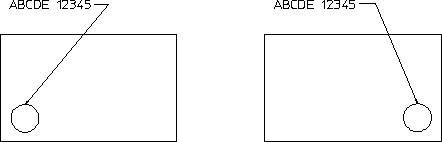
The Enter Refline command lets you create a reference line between a source element and its associated target element. Creating reference lines helps to speed-up the modification phase as it saves you time repositioning individual elements. When you move the target element of a reference line, the reference line will remain attached to the target element like a "rubber band" (see Figure 153. Effect of Moving the Target Element).
To draw a reference between two existing elements:
1. Click Enter Refline in Text.
2. Click the required option (if any) in Enter Refline. See Reference Line Options for further information.
3. Click the associated source element (such as an existing text block).
4. Optionally, click a number of points through which you want the reference line to pass.
5. Click the target element (the element to which the source element refers).
Creo Elements/Direct Drafting draws a reference line between the two elements. The newly added reference line reflects the settings defined via Reference Line Settings.
Effect of Moving the Target Element
For deletion purposes, even a multi-segment reference line is considered as a single element and can be deleted in one operation.