Viewport Example
A common application using viewports is identifying two (or more) widely separated points on a large and complex drawing.
Joining Two Widely Spaced Points Using Viewports
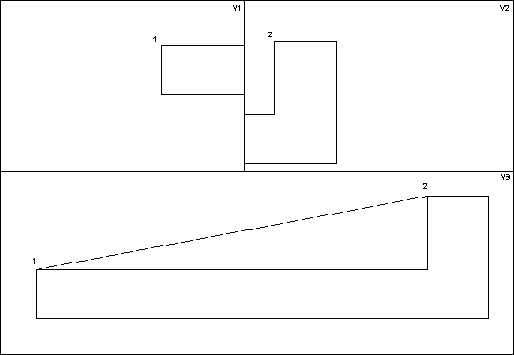
To draw a line between points 1 and 2 as shown in the figure: Joining Two Widely Spaced Points Using Viewports.
1. Create the three viewports (V1, V2 and V3).
2. Make V1 the active viewport.
3. Window into point 1 in V1.
4. Make V2 active.
5. Window into point 2 in V2.
6. Press CREATE.
7. Pick 2 Pts in LINE.
8. Identify point 1 in V1 and point 2 in V2.
Creo Elements/Direct Drafting will now draw a line between points 1 and 2.