Form Symbol
This section shows how to draw the four form symbols. Use the TYPE command to set the symbol normal or composite.
The following figure shows the four form options.
Symbol Type and Form Geometric Symbols
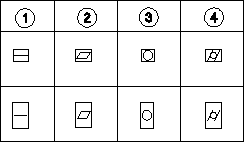
1. Straight
2. Flat
3. Round
4. Cylinder
To draw a form symbol:
1. Press SYMBOLS 1.
2. Pick the required option in FORM.
3. Indicate the symbol position.
Creo Elements/Direct Drafting will now draw the symbol.