Counting Parts
This is the default option. You can obtain a parts list of all parts owned by the current part and one level below that.
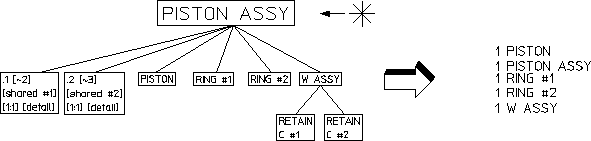
Part names beginning with a dot will not be listed, for example any detail part .1 [shared #1] [detail].
The following figure shows the active part (arrowed) and the part count produced from this structure.
Active Part and Part Count
To produce a part count:
1. Press PARTS 2.
2. Check you have the correct part active.
3. Pick Count in PART LIST.
4. Pick the destination for the parts list in OPTIONS.
Creo Elements/Direct Drafting now produces the parts list and either writes it to a file, prints it, or displays it on the screen.