Distance
You can assign a Distance constraint to any pair of geometric elements except for spline-based entities (rational splines, bsplines, and ellipses). One or both elements in a distance-constrained pair may also be dimension text, as described below. At solve time, the relative distance between the extensions of the elements in the pair is adjusted to the distance specified by the constraint. If this adjustment cannot be made, the solve fails.
The extension of an element is its construction-geometry equivalent. For example, the extension of a line segment encompasses any point that would fall on a collinear construction line. The extension of an arc element encompasses any point that would fall on a construction circle that shares the arc's center and radius.
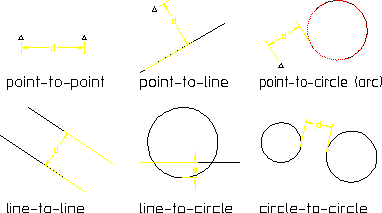
Elements in a distance-constrained pair need not be of the same type; e.g., the distance between a circle and a linear element can be constrained, as can the distance between a point element and an arc. Following figure illustrates how distance is defined for different combinations of elements.
Distance Determination
To assign a distance constraint:
1. Select ASSIGN on MENU 2.
2. Select type Distance.
3. Pick each of the two elements to be constrained.
4. Choose the distance for the constraint. You have three options:
◦ Press END or select another distance pair. The constraint distance will be set to the actual distance between the elements at solve time.
◦ Enter a specific distance value. The distance will be adjusted to this value at solve time.
◦ Enter a parameter name or Creo Elements/Direct Drafting expression that defines the distance (string input). The distance will be adjusted to the result of this expression or parametric value at solve time.
Each element in a distance-constrained pair is labeled with the distance icon, Figure 4. Constraint Icons, and a reference number that is unique to the pair. If the constraint is set to a specific value or parameter name, that information is appended to the icons.