Text Angle
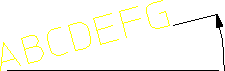
To set the text angle, enter the required value into the Angle field in Text Settings. The angular units will be those currently defined for your Creo Elements/Direct Drafting environment. A zero value implies horizontal text and a positive angle results in counterclockwise rotation. Following figure shows the text angle concept.
Setting the Text Angle