Dimension Position Settings
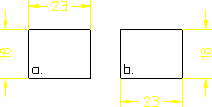
By default, Creo Elements/Direct Drafting attempts to auto-place dimensions above or to the right of their associated (linear) drawing elements. Using the Position list in Options under Dimension Settings, you can ask Creo Elements/Direct Drafting to place dimensions either above and to the right or below and to the left see following figure.
Automatic Dimension Positioning — Above (a.) and Below (b.)
To set the auto-placement position:
1. Click the Options tab in Dimension Settings.
2. Tick the Automatic check box under Dimension Location.
3. Select Above or Below from the Position list.