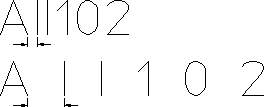
Changing the Character Spacing
The spacing between characters can be changed using the following commands:
|
CHG CONST
|
Changes the spacing between constant-spaced characters.
|
|
CHG VAR
|
Changes the spacing between variable-spaced characters.
|
To change the spacing between characters:
1. Pick CHG CONST or CHG VAR in FONT EDITOR.
2. Enter a value (measured in pixels)
The next time you enter text, Creo Elements/Direct Drafting draws the text block with the new character spacing.
Characters with Constant Spacing
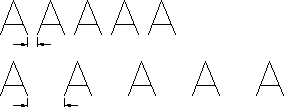
Characters with Variable Spacing