Associative Documentation Update
This chapter tells you how to use the Associative Documentation Update (ADU) functionality.
ADU provides a way of reflecting 3D design modifications from Creo Elements/Direct Modeling in related 2D technical drawings (layouts) in Creo Elements/Direct Drafting.
Elements of existing technical drawings (text, symbols, and hatches) are automatically transferred to the new 2D technical drawing after a change in a 3D design. 2D dimensions associated to 3D geometry are updated automatically. Geometry and annotation changes are highlighted in user-definable colors.
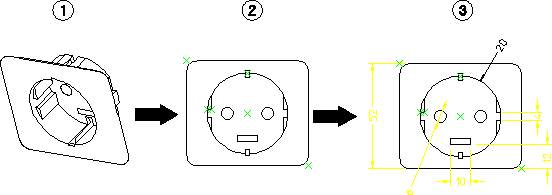
The following figure shows a 3D design (1) done with Creo Elements/Direct Modeling and its 2D layout (2) in Creo Elements/Direct Drafting. Modifications made to the 3D design are highlighted in color in the 2D layout. (Drawing 2 is the undocumented layout and drawing 3 is the documented layout.)
3D Model and 2D Layout
When modifications are made to a 3D drawing, ADU remembers identifiers and tries to relocate them in the new layout. Elements with identifiers that are found again in the new layout are shown in green and identifiers that are not found are shown in red at their original position.