Upper and Lower Tolerancing
The tolerance can either be a value, or a string of up to 24 characters. The string must be in quotes ' ' or " ". Creo Elements/Direct Drafting assumes that both upper and lower values are positive.
If you require either value to be negative, you must start the tolerance with a negative sign (-).
Upper and Lower Tolerancing
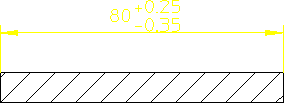
To add an upper and lower tolerance:
1. Press DIMENSION 1.
2. Pick Upper/Lower in Tolera.
3. Enter the upper tolerance value, or string.
4. Enter the lower tolerance value, or string.