Faces in Current Part
Pick FaceInPart to select faces:
• In a selected range of z-values.
• In the current part.
To color faces in a particular range of z-values as an aid to visualization:
1. Press 2D HIDDEN LINE.
2. Pick HIDD DRAW.
3. Identify the appropriate viewport.
4. Pick MENU 2.
5. Pick FaceInDrwg in SHOW LEVLS.
6. Enter the lower limit z-value, or pick an element with the lower limit z-value.
7. Enter the upper limit z-value, or pick an element with the upper limit z-value.
8. Enter an RGB color value.
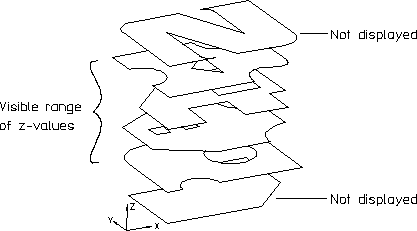
Creo Elements/Direct Drafting displays the selected faces in the required color and does not display those faces with a z-value outside of the desired range. See the following figure.
Viewing Selected Elements