Application Notes
Several powerful parametric applications are made possible by distance-constraining strategically located point elements with regard to other elements in a drawing. In both of the following examples, point elements are created specifically for use by Parametric Design. The point elements are necessary because distance constraints can only be assigned to geometric elements, not model points.
The following figure shows how distance constraints can be used to force a centerline to grow along with the rest of a part as it is resized. A point element is first assigned to each end of the centerline. Each point element is then distance-constrained to the nearest end of the part, (a). This distance will be maintained as the part is resized, (b).
Figure 235. Distance Constraints to Control Line Length

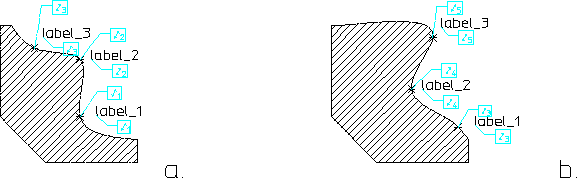
The following figure shows how distance constraints can be used to fix text labels to a given distance from a spline. The distance is maintained as the spline is reshaped. Point elements are assigned to the interpolation points of the spline and then distance-constrained to the reference points of the text elements, (a). This distance will now be maintained as the spline is changed, (b).
Figure 236. Distance Constraints to Control Text Position