Setting Hatch Patterns
Patterns consist of any number of simple hatch lines built up in layers. When you have created a pattern, it will be active every time you click Enter in Hatch. The pattern will be used to hatch all subsequent areas.
The five hatch pattern settings are described in Table 3. Hatch Pattern Parameters.
Table 3. Hatch Pattern Parameters
|
Name
|
Allowed Value
|
Description
|
|---|---|---|
|
Offset
|
0 to 1
|
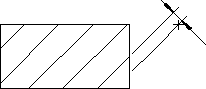
The offset is used to align the hatch lines of the layer to the match point (set using Enter Point in Hatch). The perpendicular offset is the entered value multiplied by the distance. See Figure 140. Hatch Perpendicular Offset.
|
|
Distance
|
Any Number
|
The distance between each of the layer's hatch lines will be the entered value multiplied by the distance value specified in Hatch mode.
|
|
Angle
|
0 to ± 360
|
The entered angle will be added to the angle specified in Hatch mode to determine the actual angle at which the layer's hatch lines will be drawn.
|
|
Color
|
Any of predefined colors in the drop-down list box or a custom color. Refer to Figure 140. Hatch Perpendicular Offset for instructions on defining custom colors.
|
|
|
Linetype
|
Any of the eight Drafting standard linetypes can be selected from a drop-down list box.
|
Hatch Perpendicular Offset