Breaking Dimension Lines
To break a dimension extension line around obstructing features:
1. Click Modify in Dimension.
2. Click Line in Modify.
3. Click Break in Modifysee following figure.
图 127. Broken Extension Line
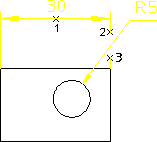
4. Click the dimension text for the dimension (1).
5. Specify the start point for the break (2).
6. Specify the end point for the break (3).
 | The break will be lost after any modification of the geometry to which the dimension is attached. |
Slanting Dimension Extension Lines
To slant dimension extension lines:
1. Click Modify in Dimension.
2. Click Line in Modify.
3. Click Slant in Modify see following figure.
图 128. Slanted Extension Lines
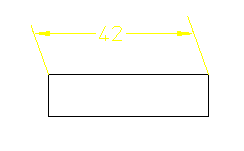
4. Type the slant angle in the User Input Line.
5. Select the dimension to slant.
The dimension extension lines are slanted by the specified angle.
| | Slant angles must be between 0 and 60 degrees, or 0 and -60 degrees. You can only slant the extension lines of single dimensions with a parallel dimension orientation. Broken or staggered dimensions can be slanted and slanted dimensions can be broken or staggered. A slanted dimension cannot be further slanted. |