Unique Partnames
Creo Elements/Direct Drafting automatically generates names for parts when you create them. These names are shown in the parts tree and are represented by numbers: [~1],[~2], ... . This feature is useful when handling parts by macros. For example, a typical parts tree may look:
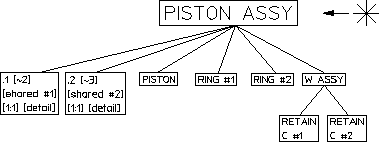
[*] PISTON ASSY [~1] [1:1]
.1 [~2] [shared #1] [1:1] [detail]
.2 [~3] [shared #2] [1:1] [detail]
PISTON [~4] [1:1]
RING #1 [~5] [1:1]
RING #2 [~6] [1:1]
W ASSY [~7] [1:1]
RETAIN C #1 [~8] [1:1]
RETAIN C #2 [~9] [1:1]
.1 [~2] [shared #1] [1:1] [detail]
.2 [~3] [shared #2] [1:1] [detail]
PISTON [~4] [1:1]
RING #1 [~5] [1:1]
RING #2 [~6] [1:1]
W ASSY [~7] [1:1]
RETAIN C #1 [~8] [1:1]
RETAIN C #2 [~9] [1:1]
The symbols and characters have the following meaning:
[*] | Current part (shown here as top part) |
[~1] | Unique partname of part--automatically generated (from 1 to n) |
[1:1] | Draw scale factor of the part (top or parts). |
.1 | Partname of detail part--automatically generated (from .1 to n) |
[shared #1] | Shared part |
[detail] | Detailed part. |
Unique-parts naming has the following functionality:
• Each part is specified by a number.
• Shared parts within shared parts are identified with the same unique partname because they exist once only in the data structure.
Shared parts within shared parts are marked with [shared in shared #n]
• Parts can be made active by entering one of the following commands:
EDIT_PART 'bracket'
EDIT_PART '~2'
EDIT_PART '~2'
If you enter EDIT_PART and the parts structure has more than one part with the same partname, Creo Elements/Direct Drafting prompts you to specify the part number.
With INQ 900 and INQ 901, you get a string list of unique partnames (~2, ~3).
• INQ_ENV 8 INQ 5 for inquiry of the offset. For loading several drawings, the maximum used unique partname can be inquired (useful when running macros).
• DELETE ALL CONFIRM resets the parts numbering.
• Refreshing partnames can be done by entering the command:
RESET_PART_NUMBER