Drawing Frame 2
1. Pick MENU 1 in PARTS 2.
2. Pick Part in INITIATE.
3. Enter "Frame 2"
4. Press 2D HIDDEN LINE.
Creo Elements/Direct Drafting displays the current z-value on the status line.
5. Pick CURR Z-VAL.
6. Enter 2
7. Press CREATE.
8. Pick Rectangle in LINE.
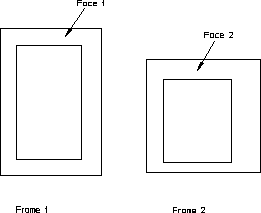
9. Draw two more rectangles as shown in the following figure.
Frame 1 and Frame 2