Aligning Dimensions
Dimensions can be aligned other dimensions. First, you identify an existing dimension and align the new dimension above, below, or adjacent to it.
Aligning Dimensions to Other Dimensions
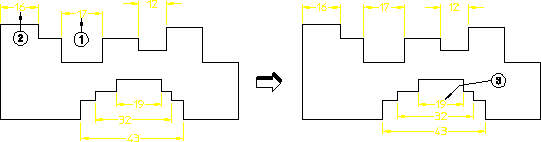
To align a dimension:
1. Click MOD TEXT in DIMENSION 2
2. Click the dimension to be aligned (point 1)
3. Click the reference dimension (point 2)
4. Drag the cursor to the new location (vicinity of point1)
5. Release the mouse button
6. Repeat for the lower dimensions (point 3)
Aligning of dimensions applies to single dimensions and not group dimensions (a group of dimensions cannot be boxed because each dimension needs a specific shift-vector). Additionally, aligning dimensions does not apply to non-linear dimensions such as:
• Diameters
• Radii
• Arcs