Smoothly Connecting Arc
To draw a smoothly connecting arc:
1. Click Arc in Geometry.
2. Click Smooth.
3. Click an element end point (line, circle, and so on).
4. Specify the end point of the arc.
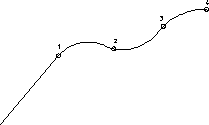
The arc is drawn tangential to the element you have clicked. With each further point indicated, another arc is drawn tangential to the previous one. In following figure , points 1 to 4 have been specified in sequence.
Smoothly Connecting Arcs