Match Point
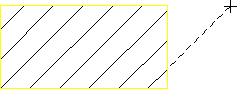
You can set a match point to be used for all subsequent hatching. One hatch line will be aligned to pass through the match point. The match point need not necessarily lie inside an area to be hatched; in this case an imaginary extension of the hatch lines would pass through the hatch point.
The below figure shows the hatch pattern aligned with an external match point.
Hatch Pattern Aligned with Match Point
To set the hatch match point:
1. Click Drafting and then, in the Annotate group, click the arrow next to  Hatch.
Hatch.2. Click  Match Point.
Match Point.3. Specify a point for the hatch line to pass through.
One hatch line of all subsequent hatching passes through the new match point.