Line Width vs. Line Size
The thickness of elements can be set by setting the line width or line size properties.
Note that line width differs from line size:
• Line width (pen size) and line size are mutually exclusive: Specifying linesize resets pensize to 0, and specifying pensize resets linesize to 0.
• When you scale (increase or decrease the size of) an element drawn in a given line size, this line size will change with the size of the element.
• When you scale an element drawn in a given line width, the line width remains unchanged even if you scale the element. This behavior reflects the pen width concept of a conventional drawing board: an enlarged detail of a part is drawn with the same pen as the part.
• Line size supports HP-GL/2 and PostScript.
Scaling with Pensize and Linesize

Item | Description |
|---|---|
1 | Line Width (Pen Size): The line is non-scalable. This means that if you create a line having a pensize of 1mm, and then scale it by a factor of 2, the thickness of the line remains 1mm. |
2 | Line Size: The line is scalable. In this case, if you create a line having a linesize of 1mm, and then scale it by a factor of 2, the new thickness of the line is 2mm. |
The below figure shows one benefit of specifying pensize and linesize for specific elements.
Difference between Pensize and Linesize
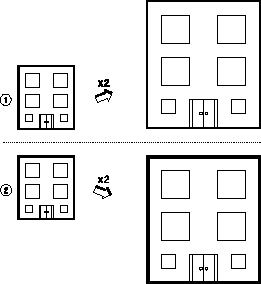
1. All geometry elements are drawn with the property pensize. When scaled, all lines remain the same size (thickness).
2. The outline of the building is drawn with the property linesize. All other elements are drawn with the property pensize. When scaled, the thickness of the outline increases but the other elements remain the same thickness.
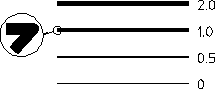
The below figure shows some sample sizes. The ends of lines are rounded so that when more than one line intersects, a rounded end is formed. Otherwise, the line end would appear stepped.
Lines Drawn with Different Sizes