With Copy
To copy a part to the active part:
1. Press PARTS 1.
2. Pick Copy in GATHER PRT.
3. Identify the part to be gathered or enter its name.
4. Indicate a reference point for the copy operation.
5. Indicate the location for the reference point.
Creo Elements/Direct Drafting copies the part such that the new part is owned by the active part.
See the following figure (Gathering a Part). Consider you have incorrectly created the part RETAINING CLIP # 1 as a subpart of PISTON ASSEMBLY. Pick GATHER PRT to transfer RETAINING CLIP # 1 to its correct position as a subpart of WRIST ASSEMBLY.
Gathering a Part
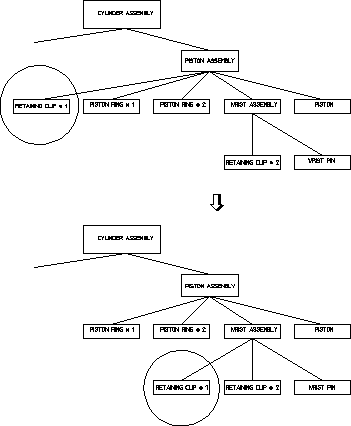
To transfer RETAINING CLIP # 1 to its correct position as a subpart of WRIST ASSEMBLY:
1. Press PARTS 1.
2. Pick Part in EDIT.
3. Identify WRIST ASSEMBLY.
Creo Elements/Direct Drafting makes WRIST ASSEMBLY the active part.
4. Pick Delete Old in GATHER PRT.
5. Identify RETAINING CLIP # 1.
Creo Elements/Direct Drafting transfers the part so that it becomes a subpart of WRIST ASSEMBLY.