Adjust
You can adjust the position of the cursor in the text box when locating text on the screen. This is useful for aligning text in tables.
To adjust the position of the cursor in the text box:
1. Press TEXT 1.
2. Pick Adjust in SET.
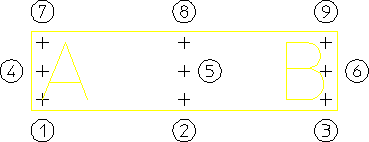
The present cursor positioning in the text box will be displayed by a number between 1 and 9. The following figure shows the numbers and the corresponding cursor positions in the text box.
Figure 175. Cursor Positions in the Text Box
3. Enter a new value between 1 and 9.
The cursor will be in the new position for all subsequent text positioning.