Space
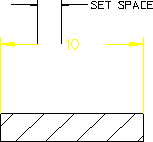
The Space field enables you to specify a gap between the dimension text and its associated dimension line.
 |
This gap is shown only if the dimension text location is set to On. See Dimension Text Location.
|
To set this space:
1. Click the Line tab in Dimension Settings.
2. Enter a positive value (such as 2.3) into the Space field.
Following figure shows the distance between the inner ends of the dimension lines and the dimension text. The Creo Elements/Direct Drafting default for this distance is 2 mm.
Distance between Dimension Lines and Text