Dimension Text Orientation
The orientation of the dimension text can be one of the following:
Dimension Orientation
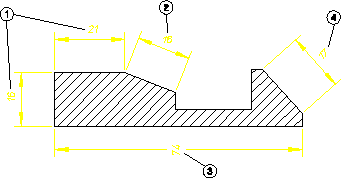
1. Parallel to the dimension line. This is the default.
2. Horizontal (2).
3. Vertical (3).
4. Perpendicular to the dimension line.
To set the orientation of dimension text:
1. Click the Text tab in Dimension Settings.
2. Select one of the following settings from the Orientation list:
◦ Parallel
◦ Horizontal
◦ Vertical
◦ Perpend