Dimensioning Arcs
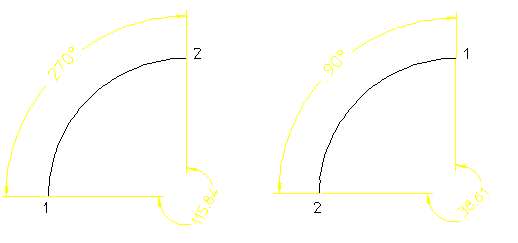
Creo Elements/Direct Drafting can measure the length or angle of the major or minor arc. When dimensioning arcs singly, you determine which measurement is used by selecting either the start or end point of the arc first. When dimensioning multiple arcs at once, the length or angle of the major arc will be measured Creo Elements/Direct Drafting measures arcs in a counterclockwise direction. Dimensioning the length or angle between two arcs is also possible, but only for arcs with the same radius and center.
You can locate the dimension either inside or outside the arc.
To dimension an arc using  Arc Length:
Arc Length:1. Click Drafting and then, in the Annotate group, click the arrow next to  Circular.
Circular.2. Click Arc Length.
Arc Length.3. Select the arc features to be dimensioned. You can either:
◦ Identify the first and second end points on individual arcs. The order in which you select the endpoints determines whether the major or minor arc is dimensioned.
◦ Identify one or more arc elements using the Select window or by enclosing them in a box. The major arc will be dimensioned for all selected arcs.
4. If you have cleared the Automatic check box (automatic dimension placement) in the Options settings of the Dimension Settings dialog box, click the desired location for the dimension text or texts, using the dimension trace for guidance.
5. Click  OK.
OK.
OK.To dimension an arc using  Arc Angle:
Arc Angle:1. Click Drafting and then, in the Annotate group, click the arrow next to  Angular.
Angular.2. Click Arc Angle.
Arc Angle.3. Select the arc features to be dimensioned. You can either:
◦ Identify the first and second end points on individual arcs. The order in which you select the endpoints determines whether the major or minor arc is dimensioned.
◦ Identify one or more arc elements using the Select window or by enclosing them in a box. The major arc will be dimensioned for all selected arcs.
4. If you have cleared the Automatic check box (automatic dimension placement) in the Options settings of the Dimension Settings dialog box, click the desired location for the dimension text or texts, using the dimension trace for guidance.
5. Click OK.
OK.The following figure shows two possible results of length and angle dimensions obtained using Arc Dimension UI. Each arc end point is marked in the order in which it has been identified.
Dimensioning Arcs — Two Results