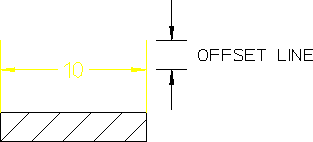
Setting Dimension Offset
Various national standards are used for dimensioning (American Standards, British Standards, and so on). You can set the distance (or offset) between the top end of the extension line and the dimension line to conform to the standards you use. The Creo Elements/Direct Drafting default for this distance is 2 mm.
To set the dimension offset:
1. Pick SET LINES from the DIMENSION 3 screen menu.
2. Pick OFFSET LIN.
3. Enter a positive value for the distance.
Creo Elements/Direct Drafting sets this distance for all subsequent dimensions. The style display window is updated if necessary to reflect the change.
To set the distance between the top end of the extension line and the dimension line to 3 mm:
1. Pick SET LINES from the DIMENSION 3 screen menu.
2. Pick OFFSET LIN.
3. Enter 3.
Creo Elements/Direct Drafting sets the offset distance to 3 mm for all subsequent dimensions.
Dimension Offset Line Distance