Mirror
When a pair of elements are constrained to be a Mirror pair, Solve will attempt to move and/or resize both elements as needed so that their extensions mirror each other across a specified line of symmetry. The extension of an element is defined as the element's construction-geometry equivalent. For example, the extension of an arc is the construction circle that shares the centerpoint and radius of the arc. The extension of a line element is a collinear construction line.
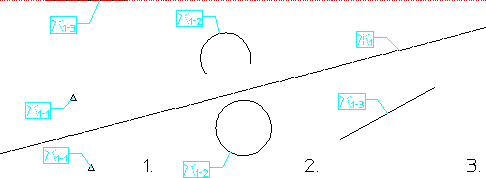
Both elements in the mirrored pair must be of the same type (e.g., both circles, both lines, or both points), but need not be the same size. Mirrored lines may be of different lengths, and an arc and a circle can mirror each other. Spline and ellipsoid elements are not eligible for mirror constraints, though some measure of control over these entities can be had by assigning point elements to their control/interpolation points and then fixing those point elements. The following figure shows several examples of mirrored element-pairs.
Mirrored Element Pairs
To assign a mirror constraint:
1. In the Generate Constraints dialog box, click the Assign radio button. Then pull down the Type selection list and select Mirror.
2. Click Apply.
3. Click a linear element to be the symmetry line for the mirrored pair. If this element does not already have a symmetry-line constraint assigned to it, one will be added.
4. Select a pair of elements to be mirrored across this line.
5. Click End or select another pair of elements to be mirrored about the original symmetry line.
When you successfully assign a mirror constraint, both elements in the mirrored pair will be labeled with the mirror icon, and the line of symmetry will be labeled with a symmetry line icon. See Constraint Icons. The icon for each symmetry line in the model is given a unique number, and the icon for each member in the mirrored pair contains a number in the form s-p, where s is the number of the symmetry line that this pair is bound to and p is the unique number for this mirrored pair.