Application Notes
Parametric Design can automatically assign symmetry-line constraints to lines having a particular color and linestyle. You enable this behavior by calling the function PD_AUTO_SYMMETRY YES from the Creo Elements/Direct Drafting command line, or by including it in your pd_def.mac file. The functions PD_AUTO_SYMMETRY_COLOR and PD_AUTO_SYMMETRY_LINETYPE specify the color and linetype. See Parametric Design Defaults for more information.
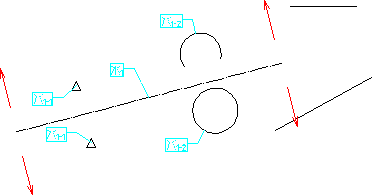
Complete only extracts mirrored pairs from areas that are orthogonal to defined symmetry lines. If your symmetry lines have infinite length (e.g., construction lines) this is no limitation, but if you choose a finite-length element as a symmetry line, items must lie completely within the orthogonal boundary in order to be selected for mirroring. For examples, in the following figure, the two line segments on the right are not extracted because they do not fall within the boundary. If you are assigning mirrored pairs manually, this limitation does not apply.
Auto-selection of Mirrored Pairs