Application Notes
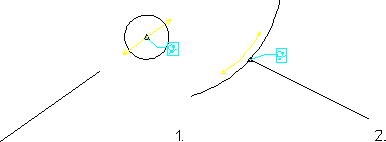
Two common applications for Point on constraints are shown in the below figure. Circles can be constrained to stay on a linear element by fixing the centerpoint on the line. Conversely, elements can be constrained to remain attached to the perimeter of a circle, ellipse or spline.
 |
To assign a Point on constraint to the centerpoint of a circle or arc, you must first display centerpoints (with the Vertex check box clicked in the Creo Elements/Direct Drafting Show dialog box) and then click the centerpoint directly.
|
Point-On Applications