Measuring a Detail
2D Access has a measuring facility which lets you accurately determine geometrical values from your drawing. The groups MEASURE and CATCH combine to form a powerful tool in the determination of geometrical values.
This part of the tutorial shows you how to measure basic drawing features.
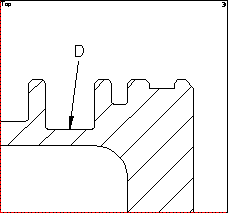
In the drawing, a dimension has been accidently left out. The detail for this missing dimension is in the top right-hand viewport 3. To measure the length:
1. Pick LENGTH.
2. Pick line D shown in the following screen display.
2D Access displays the value for the length in the User Input Line at the bottom of the screen.
3. Press [Return] to continue.
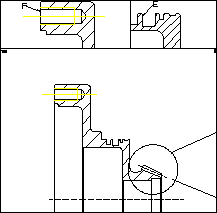
Now you need to find out the horizontal distance from the edge E to the detail edge F. This is shown in the viewports 2, and 3. To do this:
1. Pick DIST.
2. Enter the qualifier HORIZONTAL using the keyboard.
3. Pick the two points E and F as shown above.
2D Access displays the distance in the User Input Line.
4. Press [Return] to continue.