Rewriting the Item
To rewrite the item using the Requirement Assistant, perform the following steps.
1. After analyzing the item, in the Rewrite tab, select the required options.
Based on the analysis, the following options are available for rewriting.
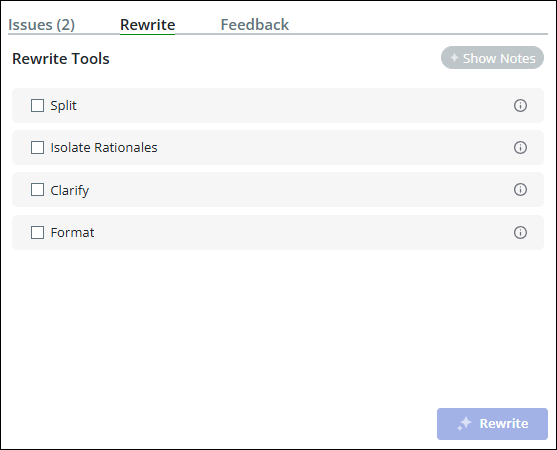
◦ Split—Split the input text into distinct single thoughts and formulate a set of minimal requirements that are saved as separate items.
The Split Requirement displays the split items.
Use Edit Requirement to edit the split items before saving them.
Click Save Requirements to save the new items.
◦ Isolate Rationales—Isolate the rationale from the main item statement.
Rationales justify the main thought and are saved in a separate field with the item.
 |
If the item includes a rationale, Rewrite Notes suggests the further action.
|
◦ Clarify—Remove unclear constructs and ensure that the item meets the basic structural form with a clear subject and action verb. By default, this option is available to all the Requirement Assistant users.
◦ Format—Classify and format the item according to the templates. The following are the default templates based on the type of item.
▪ Characteristic —[SUBJECT_SYSTEM] [MODAL_VERB] [ACTION_VERB] [CHARACTERISTIC] [CONDITION]
▪ Design Constraint—[SUBJECT_SYSTEM] [MODAL_VERB] [ACTION_VERB] [CONDITION]
▪ Functional—[SUBJECT_SYSTEM] [MODAL_VERB] [PERFORMANCE] [CONDITION]
▪ Interface—[SUBJECT_SYSTEM] [MODAL_VERB] [INTERFACE] [PERFORMANCE] [CONDITION]
By default, this option is available to all the Requirement Assistant users.
Project Administrators have the ability to enable or disable and configure the rewrite tools. For more information, refer Project Administration Tasks for AI Assistants.
2. Click Rewrite.
The updated item is displayed in the editor.
3. Click  to save the updated text.
to save the updated text.A Save Requirement dialog box appears. Click Accept to save the changes.
After the rewrite is complete, the Rewrite Notes option suggests how to improve the requirement.
|
|
The rewrite functionality currently supports and is certified for English language. For rewriting in German language, currently English prompts are used. This may sometimes provide low quality output and does not strictly follow the German format template. This will be improved in future releases. Other languages are not supported.
|