Configure the Azure AD Authentication
Microsoft Entra ID parameters are used to configure authentication between the Codebeamer AI plugin and the customer‑hosted Codebeamer AI service.
Configure Codebeamer and Azure AD connection, in customer-hosted deployment, as follows:
1. Log in into Codebeamer as a system administrator using a web browser.
2. Open the URL {{CODEBEAMER_BASE_URL}}/sysadmin/aiAtlasConfiguration.spr. For example, https://localhost:8080/sysadmin/aiAtlasConfiguration.spr.
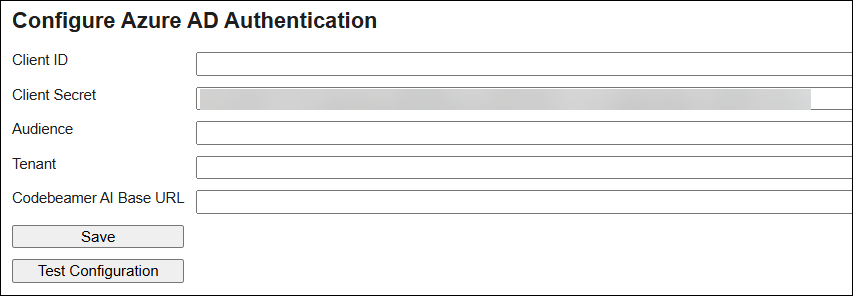
3. To configure the service principal, enter the values for the following parameters:
|
Parameter
|
Values
|
Description
|
|---|---|---|
|
Client ID
|
Application client ID.
|
A unique identifier assigned to an application during registration in Entra ID.
|
|
Client Secret
|
Client secret value.
|
A password-like credential used by confidential clients (web apps) to prove their identity to Entra ID.
|
|
Audience
|
Audience Claim
|
The Application ID or App ID URI of the API for which the token is intended. The receiving API must validate this claim.
|
|
Tenant
|
Tenant ID
|
A dedicated instance of Azure AD representing an organization or a customer (e.g., in B2C).
|
|
Codebeamer AI Base URL
|
Codebeamer AI service base URL
|
Codebeamer URL
|
 |
Incorrect Entra ID values will prevent the Codebeamer AI plugin from authenticating with the customer‑hosted AI service.
When this occurs, Codebeamer AI features will not work, and connection tests will fail.
|
4. Click Save.
5. Click Test Configuration for a ping test.